A crowded Mac menu bar is a small problem that becomes surprisingly expensive: icons disappear behind a notebook notch, utilities compete for the same few pixels, and the item you need is always the one you cannot reach. Ice treats the menu bar as something to organize rather than something to endure.
Ice is a free, open-source macOS menu bar manager and a GPL-3.0 alternative to tools such as Bartender, Hidden Bar, Vanilla and Dozer. The current project is distributed through GitHub Releases rather than the App Store, so the important part is understanding both its useful organization model and the permissions its implementation needs.
What It Does
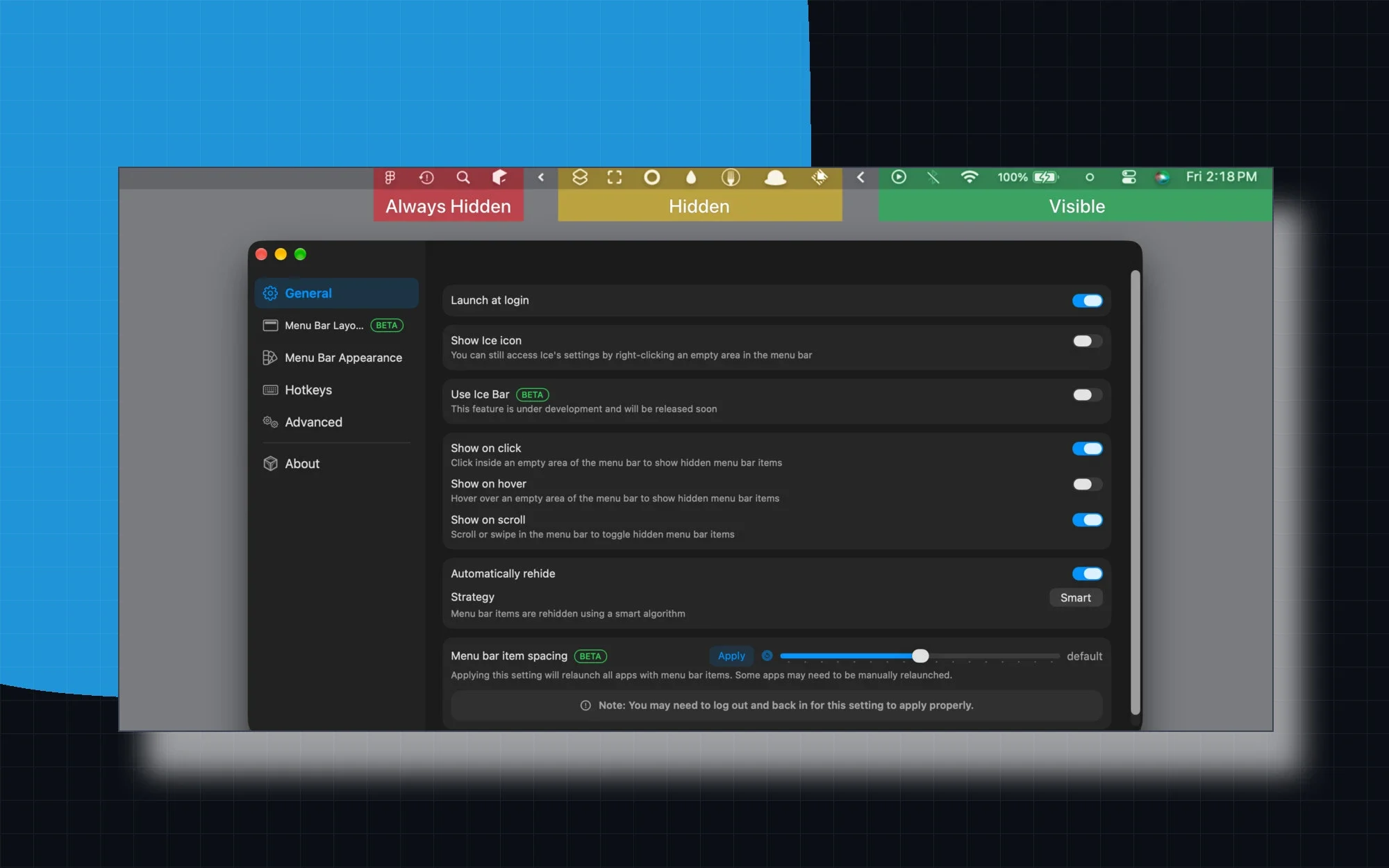
The core model is simple: place menu bar items in Visible, Hidden or Always-Hidden sections. Ice can reveal hidden items when you hover over an empty area, click, scroll or use a hotkey, then automatically re-hide them. Drag-and-drop ordering and item spacing keep the result predictable instead of turning the menu bar into another launcher.
The Always-Hidden section is useful for icons that should stay out of the way until deliberately revealed. The ordinary Hidden section is better for items you check occasionally. That distinction is small, but it means a busy menu bar can have both a quiet default state and a quick temporary reveal without moving icons back and forth.
On a notched MacBook, Ice Bar adds a second full-width menu bar for items that would otherwise disappear behind the camera housing. The app also offers tint, gradient, border, shadow and shape controls, keyboard shortcuts, launch-at-login and automatic updates. Its README describes the project as local and private: no account, telemetry or subscription is required.
How to Install It
Ice does not publish an App Store listing. The practical installation path is the official GitHub Releases page: download the current Ice.zip, unzip it and move Ice.app into /Applications. Homebrew is also documented by the project, but it is an optional package-manager route rather than a reason to build the app yourself.
# Open the latest official GitHub Release:
open https://github.com/cavaldos/Ice/releases/latest

# Unzip Ice.zip and move Ice.app to /Applications.
The first launch can trigger Gatekeeper because the release is ad-hoc signed rather than notarized; use Finder's right-click Open action if macOS blocks it. Ice needs Accessibility to hide and move menu bar items, and Screen Recording to read item images and provide Ice Bar. Those permissions are not incidental: after every update, the new ad-hoc build may need them granted again.
How to Use It
After launch, open Menu Bar Layout and drag items between Visible, Hidden and Always-Hidden. Start with a conservative split: keep essential connectivity, battery and audio controls visible, put occasional utilities in Hidden, and reserve Always-Hidden for items you want to reveal only on purpose.
Choose a reveal gesture that matches your habits. Hovering is fast for a glance, clicking an empty area is deliberate, and scrolling keeps the interaction close to the menu bar itself. If the notch is the problem, enable Ice Bar and give hidden items their own row instead of trying to squeeze them around the camera.
# Optional Homebrew route:
brew tap cavaldos/tap
brew install cavaldos/tap/ice
Themes and spacing controls are best treated as finishing touches. First make the three sections behave correctly, then adjust tint, borders, shape and spacing so the menu bar remains legible in both light and dark appearances. Hotkeys can expose a hidden group, toggle Ice Bar or show an application menu without opening the settings window.
# If an update leaves stale privacy entries:
tccutil reset Accessibility com.jordanbaird.Ice
tccutil reset ScreenCapture com.jordanbaird.Ice
Screenshots and Visual Details
The project's gallery makes the organization model easy to understand: the menu bar is visibly divided into Always Hidden, Hidden and Visible groups, while the settings window exposes the same structure through Menu Bar Layout. The fullscreen settings view, Ice Bar example and appearance panels show that this is more than a single hide/show toggle.
Under the Hood
Ice is a native Swift and SwiftUI macOS application. Its most important system integration is Accessibility: the app needs to inspect and move menu bar items instead of merely drawing a fake toolbar. Screen Recording is used for menu bar item images and the Ice Bar, which explains why the permission list is longer than a typical menu utility's.
The release model is intentionally lightweight but has a trade-off. Ad-hoc signing avoids requiring a paid Developer ID distribution path, yet macOS records a pinned code hash for privacy permissions. When a new build changes that hash, a toggle that still looks enabled in System Settings can behave as though it were denied until the stale TCC entries are reset and access is granted again.
Repository and Releases
The source lives in the cavaldos/Ice repository. At the time of review, the latest tagged release is v0.11.19, published on September 16, 2026, while the default branch remains active. The latest release page is the right place to download rather than copying an old asset URL into a script.
Ice is a fork of Jordan Baird's original project, and the current README keeps the bundle identifier com.jordanbaird.Ice in its permission-reset instructions. The repository includes build and permission helper scripts as well as the app source, so developers can inspect how releases are assembled without confusing the contributor workflow with the normal user installation path.
What to Verify Before Installing
Check four things before downloading: your Mac runs macOS 14 Sonoma or later; you are comfortable granting Accessibility and Screen Recording; you know the release is ad-hoc signed and may need a right-click Open; and you are downloading from the project's official release channel. If you need macOS 13 Ventura or earlier, the README points to the older upstream Ice 0.11.x releases instead.
Where It Falls Short
Ice is not a zero-permission utility. Hiding and moving other apps' menu bar items requires Accessibility, and the visual features need Screen Recording. If your device is managed by an organization that restricts those grants, the core experience may not be available even though the app itself is free.
The ad-hoc release path also creates real maintenance friction: Gatekeeper can ask for an extra confirmation, and every update can require resetting and re-granting privacy permissions. That is a fair trade for a free project, but it is less seamless than a notarized commercial menu bar manager.
Finally, a menu bar manager depends on macOS system behavior that can change between releases. Ice currently targets macOS 14 and later and advertises readiness for newer systems, but users should still read the release notes after a major macOS update and keep a simple fallback arrangement for essential controls.
License
Ice is released under GPL-3.0. You can inspect, modify and redistribute the project under the terms of that licence, but a derivative distribution must preserve the obligations that come with GPL software. The repository's own notices remain the authoritative place for exact attribution details.
For ordinary users, the practical conclusion is straightforward: there is no paid tier or subscription to unlock, and the app is designed to remain free and open source. For anyone packaging a modified build, review the repository's bundled assets, dependencies and licence notices separately instead of assuming every file has identical terms.
Should You Install It
If your menu bar is crowded, your MacBook notch hides useful icons, and you are comfortable with two privacy permissions, Ice is an unusually complete free option. Start with the current GitHub Release, keep the source-build route for contributors, and remember that an update may require the permissions to be recorded again.
Project facts
- License
- GPL-3.0
- Platform
- macOS 14 Sonoma or later / macOS 27 ready
- Written in
- Swift, SwiftUI
- Version reviewed
- v0.11.19 (2026-09-16)
- Repository
- github.com/cavaldos/Ice
Install
# Open the latest official GitHub Release:
open https://github.com/cavaldos/Ice/releases/latest

# Unzip Ice.zip and move Ice.app to /Applications.
License summary
Ice is free and open source under GPL-3.0. Review the repository's bundled asset and third-party notices before redistributing a modified build.


