Once AI-assisted coding becomes part of daily work, the hard-to-see state is often the part that becomes messy: Claude, Codex, Gemini and Grok use different quota windows; token usage is scattered across CLI logs; and an aborted agent can leave an MCP process behind. VibeGauge puts those signals in a native Mac menu-bar panel so you can see the state of your quotas and machine before starting the next request.
This article follows the v1.1.2 release, its tagged README, source structure and release assets. It is a source-based review, not a hands-on installation report. Development-branch changes should not automatically be treated as features of the current download, and local analysis is separated below from the functions that do make network requests.
See the quota before you plan the session
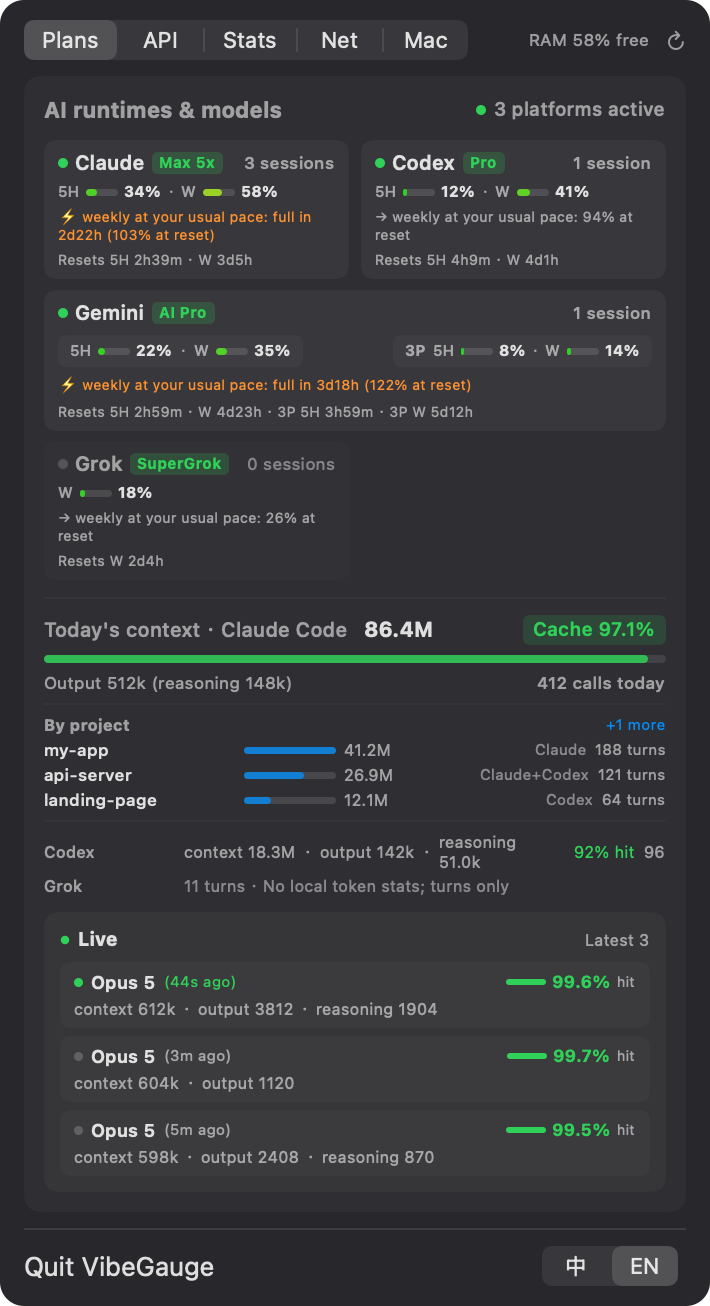
The Subscriptions panel brings together Claude, Codex, Gemini / Antigravity and Grok plan state, usage and reset timing. The sources differ: some values come from local session logs, some from the official status-line data passed by a CLI, and some from cached files. When a source has no usable value, VibeGauge reports that instead of inventing a real-time number.
The weekly forecast does not simply multiply today's pace by seven. It considers when you actually used the tools over the last seven days, what happened in the previous cycle, and the recent pace of shorter windows. A heavy evening does not automatically become an all-night prediction. A forecast is still a forecast, not a provider guarantee.
Keep token and cache analytics explainable
The Statistics view can aggregate context, output and thinking/reasoning tokens, request counts and prompt-cache hit rate, with a recent-interaction inspector. History is stored in ~/.config/vibegauge/usage-daily.json and scanned incrementally from local logs. In v1.1.2, a call that appears in CLI logs and also passes through the proxy is no longer double-counted in historical cost.
Cost is not guessed from a universal price table. VibeGauge reads the price entries you provide in ~/.config/vibegauge/prices.json; it ships no built-in production prices, and unpriced models are excluded from API-equivalent cost. For a real bill, compare the result with the provider's account data and your own price configuration.
A process reaper needs a boundary
The Orphaned MCP Reaper looks for headless node or python processes whose parent is gone, that have no listening ports, are not on a system whitelist and match MCP signatures. It can also clear ~/.npm/_npx cache bloat and run an optional quiet sweep every 30 minutes. Because the action terminates processes, review the list before using it; this is not unconditional garbage collection.
Version 1.1.2 fixes a particularly important edge case: a regular background tool started with npx is no longer treated as an MCP server merely because its terminal has closed. Official MCP servers are recognized separately, and VibeGauge re-checks listening ports and the automatic-cleanup switch before sending a signal, then reports how many processes actually exited.
The Network tab is a diagnostic, not proof of everything
The Network view probes /cdn-cgi/trace on domains such as Anthropic, ChatGPT, OpenAI API and Grok to show egress IP, IPv6 reachability and possible DNS-leak indicators. Gemini's route is inferred from the local Clash connection table. VibeGauge can read a loopback Clash, mihomo or sing-box controller, but it does not change network configuration.
These are indicators, not proof that every request follows the same route. Failed probes remain unavailable or unknown instead of turning into a reassuring green result. For a network-sensitive workflow, that explicit limit is more useful than a confident score with unclear meaning.
Local-first does not mean zero network activity
Usage analysis does not upload prompts or usage logs; token history and local caches stay on the Mac. When you connect Claude Code or agy quota data, VibeGauge installs a reversible status-line bridge, backs up the existing setting and passes the same input to the original command. It does not read credentials or log in as you.
There are still explicit network paths: a daily public GitHub API update check; the trace and route probes described above; an optional API proxy that keeps a key in memory and contacts the relevant provider's balance endpoint; and optional remote Codex synchronization through passwordless SSH. Enable those features according to your own threat model.
Installation: download the universal ZIP
No official Mac App Store listing for VibeGauge was found at the time of checking. Download VibeGauge v1.1.2 or open the release page first. It is a universal Apple silicon and Intel build for macOS 14 or later. Unzip it, move VibeGauge.app to /Applications, and launch it; the app appears in the menu bar.
If macOS shows a Gatekeeper prompt on first launch, follow the project's instructions to use System Settings → Privacy & Security → Open Anyway. If you use Bartender, Ice or another menu-bar organizer, check that VibeGauge has not been moved into a hidden drawer.
For a download-integrity check, place the VibeGauge.zip.sha256 beside the ZIP and run this from that directory:
shasum -a 256 -c VibeGauge.zip.sha256A release build means source compilation is optional
Because v1.1.2 has a usable pre-built package, source compilation is for contributors, code changes and self-tests rather than the normal end-user path. The project uses Swift, SwiftUI and AppKit, and its README describes zero third-party Swift dependencies; the build only needs the system Swift command-line tools.
git clone https://github.com/MaxHaiCom/vibe-gauge.git
cd vibe-gauge
./build.sh
open VibeGauge.app
The built command-line executable supports --selftest without launching the UI. --install-proxy and --uninstall-proxy manage the optional local API accounting proxy. On first use, review the System / Settings area and confirm that log locations, proxy behavior and permissions match your expectations.
Who is it for?
VibeGauge fits developers who use several AI coding CLIs and want quota windows, token volume, cache hit rate and machine-network signals one click away in the menu bar. It is also useful if you start many MCP processes and want a guarded cleanup workflow. It is not an official billing page for any model provider, cannot bypass limits, and cannot promise that third-party log formats will remain stable.
License
VibeGauge is released under the MIT License. You may inspect, modify and redistribute the source while retaining the license and copyright notice. The controlled CLIs, model providers, accounts and network services have their own terms. See the v1.1.2 changelog for the current release changes.
Project facts
- License
- MIT
- Platform
- macOS 14+; Apple silicon / Intel; native Swift, AppKit and SwiftUI
- Written in
- Swift, SwiftUI, AppKit, Python standard-library helper scripts
- Version reviewed
- v1.1.2 (checked 2026-09-23)
- Repository
- github.com/MaxHaiCom/vibe-gauge
Install
open https://github.com/MaxHaiCom/vibe-gauge/releases/download/v1.1.2/VibeGauge.zipDemo
License summary
The source is released under the MIT License. Vendor CLIs, model services and their log formats have their own terms; VibeGauge does not grant access to any provider.


