
AI tools can draft a web page quickly, but they do not finish the last round of spacing, image placement, and delivery checks for you. Chiselo is a visual macOS editor for existing HTML: open a page, refine its text, images, and layout, then export a web file, PDF, or presentation. It is not an AI generator inside the app; its focus is polishing HTML that already exists.
The source, interface, and installation documentation point to a SwiftUI and WebKit Mac app. The repository README still describes a Windows installer, so this review follows the current source, LICENSE, and user guide instead. We compiled the main branch on 2026-09-24, but did not launch the app or treat its unverified ZIP as an installer.
The last mile after HTML generation
Chiselo is aimed at developers, designers, and people who often work with AI-generated pages. When the page structure is already there but the copy, imagery, or hierarchy still needs a human pass, the app opens the source in a visual Mac workspace. You remain responsible for the design decisions, content review, and link testing; Chiselo is not a site generator, deployment service, or host.
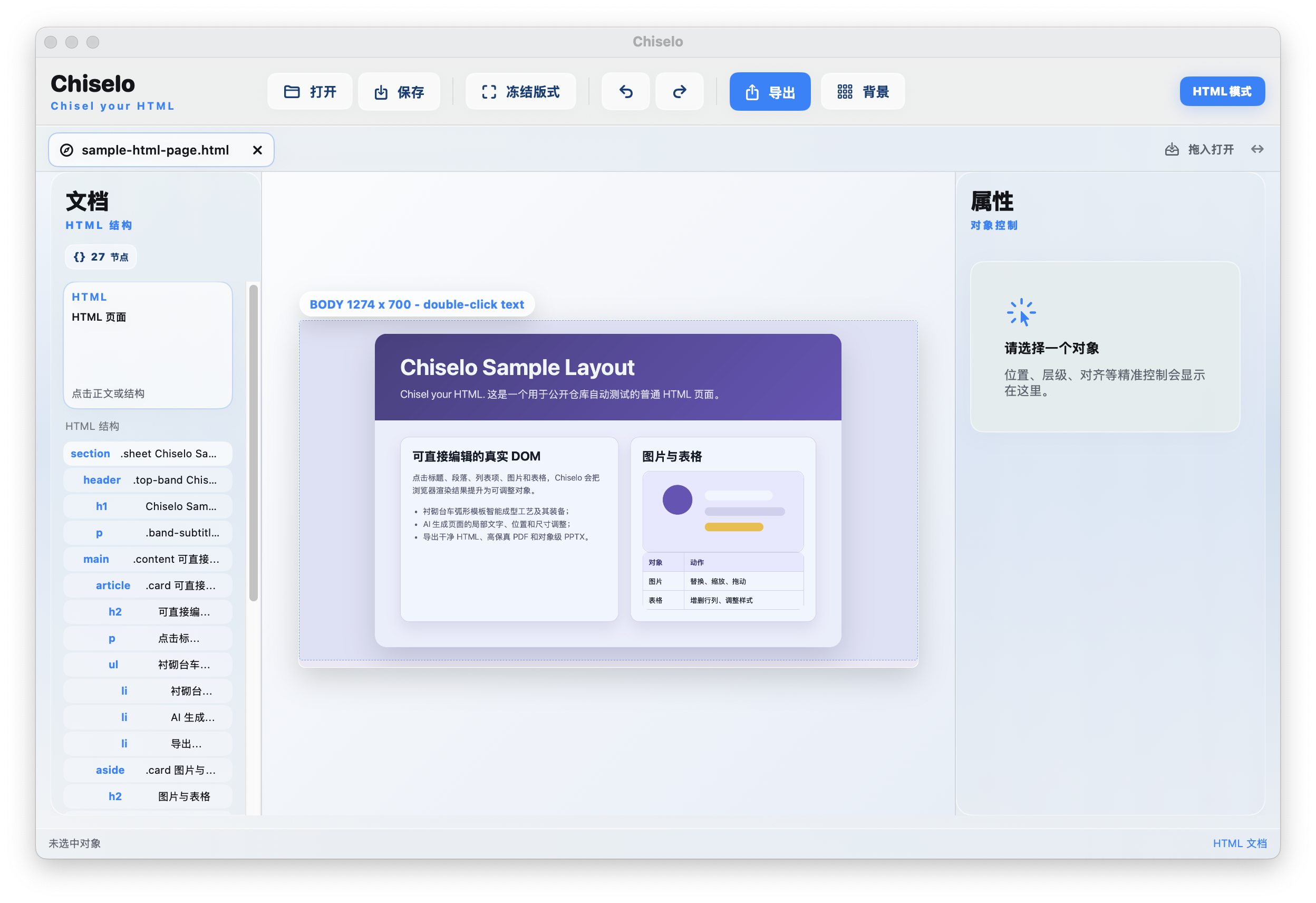
The app can open HTML, HTM, XHTML, and Chiselo project files. The rendered page sits beside a document outline and an inspector for the selected object. For an existing static page, seeing the object you are changing is often more direct than guessing which CSS rule to edit.
Edit the DOM directly, or freeze a page into an editable canvas
You can select text, replace images, adjust object geometry, and inspect layer order before saving the page. When the live HTML is not a convenient editing surface, the convert-to-editable action captures the current rendering and turns supported parts into objects that can be moved and refined.
Those workflows are not interchangeable. Direct editing keeps you closer to the existing HTML structure; a frozen layout is more suited to finishing a composition. Dynamic behavior, complex CSS, or content that cannot be separated may remain a whole object or an approximation. The export preflight flags some risks, but comparing the original page with the resulting files is still part of the job.
HTML, PDF, and PPTX are different delivery targets
Clean HTML removes editor-only traces and is intended for continued web publishing. Editable HTML is meant for further text changes in a browser. PDF follows the browser-rendered result across pages. PPTX attempts to map the page into editable presentation objects.
Do not assume a PPTX will behave like a pixel-perfect webpage screenshot. Tables, SVG, complex visual effects, overlapping objects, and stacking order can all affect the mapping. Chiselo includes an export preflight; after export, open the PDF or deck and check overflow, broken links, type size, and object order. If visual fidelity matters more than editability, compare the PDF path before choosing PPTX.
Snapshots help, but keep an independent backup
Before overwriting an existing file, the app attempts to create a version snapshot, and its interface includes snapshot browsing and restore controls. That makes an editing mistake easier to reverse, but it is not a complete backup plan: snapshots on the same computer can disappear with the original disk or an accidental cleanup.
Before detailed edits to a real project, keep a separate copy of the source HTML and its dependent images or stylesheets. If the page uses relative paths, external fonts, scripts, or network resources, open the final export from its delivery location to make sure those dependencies still resolve.
Getting it: source build for now
As of 2026-09-24, we could not confirm a Chiselo App Store listing or find a published GitHub Release installer. The README download button points to a ZIP under the repository’s config folder, not to Releases; its Windows installation steps also conflict with the SwiftUI/macOS source and the project’s own install guide. We therefore do not treat that ZIP as a verified Mac installer.
The project guide gives a Swift Package Manager route. Package.swift declares macOS 13+ and Swift tools 5.9, but those are project declarations, not a compatibility test across every macOS version. We ran swift build on Apple Silicon with macOS 27 and Swift 6.4; it completed with one capture-semantics warning. We did not run the app. This is a developer-oriented source path, not a one-click installation for most Mac users.
git clone https://github.com/Danamagentapink178/Chiselo.git
cd Chiselo
swift build
swift run Chiselo
The source commands follow the project’s installation guide. Only the build step was verified for this review; the app-launch command was not run.
Public source does not mean open source or commercial use
The repository’s LICENSE is the Chiselo Personal Non-Commercial License 1.0. It permits personal, educational, research, evaluation, and non-commercial hobby use, while prohibiting commercial use unless the rights holder grants a separate written license. The license itself says it is not OSI-approved, so source-available and non-commercial is more accurate than open source.
There is also a practical wording conflict: the README says freelance projects are allowed, while the license explicitly treats paid consulting and design services as commercial use. Do not rely on that README sentence as commercial permission. If you plan to use Chiselo for paid client work or inside a business, get written authorization first.
Who should try it, and who should wait?
If you know your way around HTML and want a native Mac workspace for visual edits, export checks, and repeated layout refinement, Chiselo presents a thoughtful end-to-end workflow. Its object inspector and preflight make the handoff from editing to delivery more visible than a code-only loop.
If you need an App Store install, a ready-to-download official build, or permission for commercial client work, wait for a verifiable release and clearer licensing guidance. Until then, treat Chiselo as a source-build project for developers who can review the terms and inspect their own output.
Project facts
- License
- Chiselo Personal Non-Commercial License 1.0
- Platform
- macOS 13+ declared by Package.swift; build checked on Apple Silicon macOS 27
- Written in
- Swift, SwiftUI, WebKit
- Version reviewed
- 0.1.11 preview docs; main @ 729232be4c6c (checked 2026-09-24)
- Repository
- github.com/Danamagentapink178/Chiselo
Install
git clone https://github.com/Danamagentapink178/Chiselo.git
cd Chiselo
swift build
swift run Chiselo
Demo
License summary
Permitted uses are personal, educational, research, evaluation, and non-commercial hobby use. Commercial use, including paid consulting or services, is prohibited unless the rights holder grants a separate written license. This is not an OSI-approved open-source license.


