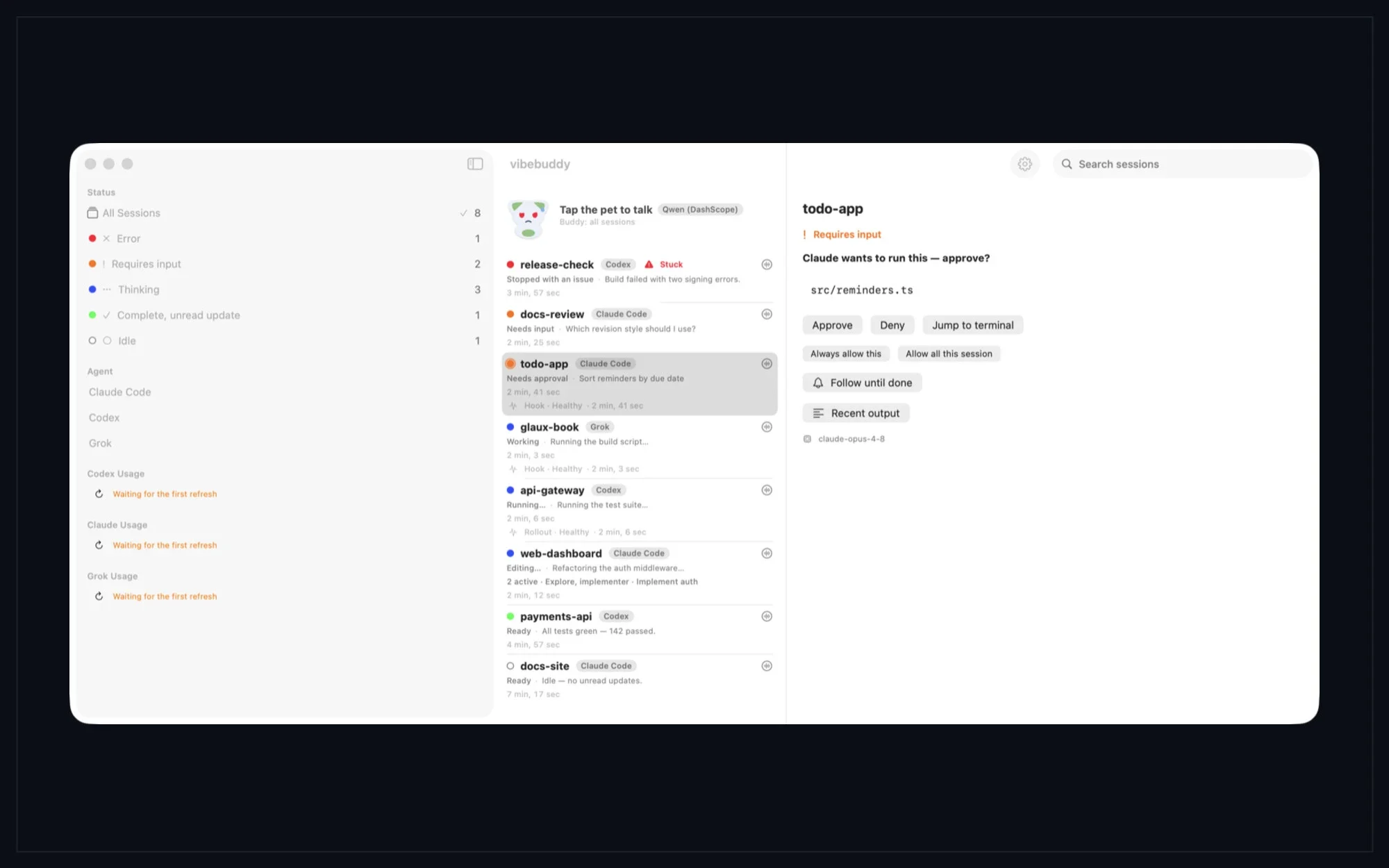
AI coding agents are good at continuing while you are away from the desk, but the useful question is often whether a task needs you, finished, or ready for a safe approval. VibeBuddy puts the Mac's agent activity into an inbox on the phone and a smaller set of results on the wrist.
The project covers a Mac menu-bar app, an iPhone app and an Apple Watch companion. It follows Claude Code, Codex, Grok Build, optional read-only Grok Bot observation and Cursor usage, while keeping the Mac as the local hub. The Mac release is v1.3.24 and the App Store listing is v1.3.23; both are free and designed to work without a VibeBuddy account.
What It Does
On the Mac, Inbox separates Needs you, Unread results and Working tasks. Rows can show the project, agent, model, current activity and available usage data. The dashboard groups work by project and provides a session reader for recent dialogue, history, search and export.
When an integration exposes a supported request, the phone can show a bounded command or diff preview and let you approve, deny or answer it. Codex tasks can be continued through a connected app-server when the task belongs to the server VibeBuddy is observing. Native prompts and unsupported actions remain on the Mac.
The companion also covers the surrounding workflow. You can review a directory and handoff prompt before continuing with another agent, keep Cursor Models and Other Models as separate usage pools, query local history through the read-only MCP layer, and see provider readings or unavailable states in iPhone widgets. The Watch surfaces followed tasks and completion results.
How to Install It
Use the VibeBuddy App Store listing for the iPhone and Apple Watch companion. For the Mac hub, download the v1.3.24 GitHub Release or its direct DMG. The Mac build requires Apple Silicon and macOS 14 or later; the iPhone app requires iOS 17 or later, and the Watch companion requires a paired iPhone and watchOS 26.5 or later.
# iPhone and Apple Watch companion:
open https://apps.apple.com/us/app/vibebuddy-agent-monitor/id6777469338

# Mac companion DMG:
open https://github.com/semantic-craft/iOS-vibebuddy/releases/download/v1.3.24/vibebuddy-mac-v1.3.24.dmg

# Drag the Mac app to /Applications, then pair the iPhone by QR code.
Drag the Mac app to Applications, launch it from the menu bar, connect only the CLIs you use, and choose Show connection code. On iPhone, install the App Store app and choose Scan to pair. Start on the same trusted local network. The Mac must remain running and reachable for live tasks and remote actions.
How to Use It
A short task in Claude Code, Codex or Grok Build makes a useful first test. Leave the agent on the Mac, open VibeBuddy on iPhone, and watch the task move from Working to completion or Needs you. Read a supported command or limited diff preview before deciding; native prompts stay on the Mac.
For history, open Settings → Connect on the Mac and copy the setup snippet for Claude Code, Codex or Cursor. The bundled vibebuddy-mcp process provides read-only sessions, projects, search, show, summary and status queries over local history; it does not start the daemon, approve work or mutate a library.
# Pairing loop:
# Mac: Settings → Devices & connection → Show connection code
# iPhone: Scan to pair
# Keep the Mac running and reachable for live task data.
The local connection is HTTP/WebSocket with bearer authentication, not built-in TLS. Use a trusted LAN or a protected private network such as Tailscale, keep the pairing QR and token private, and do not expose port 9876 directly to the public internet.
# Build from source only for development:
git clone https://github.com/semantic-craft/iOS-vibebuddy.git
cd iOS-vibebuddy
xcodegen generate --spec VibeBuddyMacApp/project.yml
open VibeBuddyMacApp/VibeBuddyMacApp.xcodeproj
The Mac, iPhone and Watch Split
The Mac is where sessions are read and provider hooks, approvals and native terminal boundaries live. The iPhone is the remote inbox for usage, widgets, Live Activities and task updates. The Watch receives snapshots through the iPhone, so it is a glance and notification surface rather than a direct Mac client.
A Local-First Boundary
VibeBuddy does not operate a session cloud, require a VibeBuddy account or collect analytics. Mac and iPhone communicate directly with bearer authentication, and the Watch receives a snapshot through the paired iPhone. Optional voice and summary requests go directly to the provider you choose; provider terms, retention and charges still apply.
Monitoring and ordinary approvals do not need a VibeBuddy AI key. Voice and summaries do: the app can use OpenAI, Google Gemini, Alibaba Qwen or Volcengine Doubao, and the request leaves the device for that provider. Check how project text, terminal output and personal speech are handled before enabling it.
Voice, Notifications and Usage
Voice is off by default. Optional summaries or read-aloud output can be enabled, while text monitoring and button-based approvals remain usable without an AI API key. A notification can point to a waiting task without turning every status update into a model request.
Closed-app push notifications need an Apple Push Notification setup. The public downloads are not a turnkey hosted push service, so reliable delivery requires configuring the APNs path and owning its operational details. When the app is open, local updates and the Mac connection are the simpler baseline.
What v1.3.24 Changes
The Mac v1.3.24 release improves the dashboard: the sidebar can resize or collapse into an icon rail, the session-list divider is adjustable, and search can expand the compact layout. The Get Started card groups CLI hooks, the iPhone download and inline pairing, while summaries and speech wait for native completion.
Where It Falls Short
VibeBuddy is a companion, not a replacement for Claude Code, Codex, Grok, Cursor or the Mac that runs them. A powered-off, sleeping or unreachable Mac means no live task state and no remote action. Apple Watch also depends on the paired iPhone, and App Store availability can vary by region.
Support is capability-based. Grok Bot observation is read-only, Cursor usage is separate from Cursor task control, and some native prompts still require the Mac. Closed-app push needs extra APNs work, voice depends on a provider and key, and the local HTTP/WebSocket design is not a reason to expose the daemon publicly.
Source build is available for contributors and custom signing, but it is not the normal installation path. The repository asks for Xcode 26.6, Swift 6 and XcodeGen; device builds need your signing team, identifiers and capabilities. Start with the App Store and Mac Release assets, and build only when they do not meet your use case.
License
The project is released under the MIT License. You can inspect, modify, use and redistribute the project, including in commercial software, as long as the copyright and license notice remain with the relevant distribution. The license is provided without warranty.
The MIT notice covers the repository's code, not every external service or account in a workflow. Apple platforms and App Store terms, Claude Code, Codex, Grok, Cursor, optional AI providers, Swift packages and your agent credentials keep their own rules. VibeBuddy is an independent project, not affiliated with those providers or Apple.
Should You Install It
If your Mac already runs AI coding agents and you want a calm way to see what needs you from another room, VibeBuddy is a credible fit. Install the iPhone companion from the App Store, install the Mac hub from the v1.3.24 DMG, keep the endpoint private, and add voice or push only when you are ready to own the provider keys and delivery setup.
Project facts
- License
- MIT
- Platform
- macOS 14+ / Apple Silicon; iOS 17+; watchOS 26.5+ with a paired iPhone
- Written in
- Swift 6, SwiftUI
- Version reviewed
- Mac v1.3.24 / iPhone v1.3.23 (2026-09-21)
- Repository
- github.com/semantic-craft/iOS-vibebuddy
Install
# iPhone and Apple Watch companion:
open https://apps.apple.com/us/app/vibebuddy-agent-monitor/id6777469338

# Mac companion DMG:
open https://github.com/semantic-craft/iOS-vibebuddy/releases/download/v1.3.24/vibebuddy-mac-v1.3.24.dmg

# Drag the Mac app to /Applications, then pair the iPhone by QR code.
License summary
The Mac app, iPhone app, Watch companion, daemon, shared Swift models and hooks are MIT-licensed. AI providers, Apple services, third-party packages and your own agent accounts retain their own terms.


