A MacBook’s speakers and an external speaker do not have to play exactly the same signal. MultiSpeaker takes a more specific approach: let the built-in speakers handle the midrange and treble, send bass to the external output, and adjust the timing between them.
The project is a SwiftUI utility around CoreAudio, BlackHole and CamillaDSP. This is a documentation and source review of v1.1.0, released on October 19, 2026. The official ZIP and its published checksum were checked; listening quality, latency and hardware compatibility have not been independently measured.
What the audio routing actually does
System audio first goes into BlackHole 2ch, which becomes the Mac’s default output. CamillaDSP reads that virtual input, applies high-pass and low-pass filters, and sends four channels to an aggregate device named MultiSpeaker.
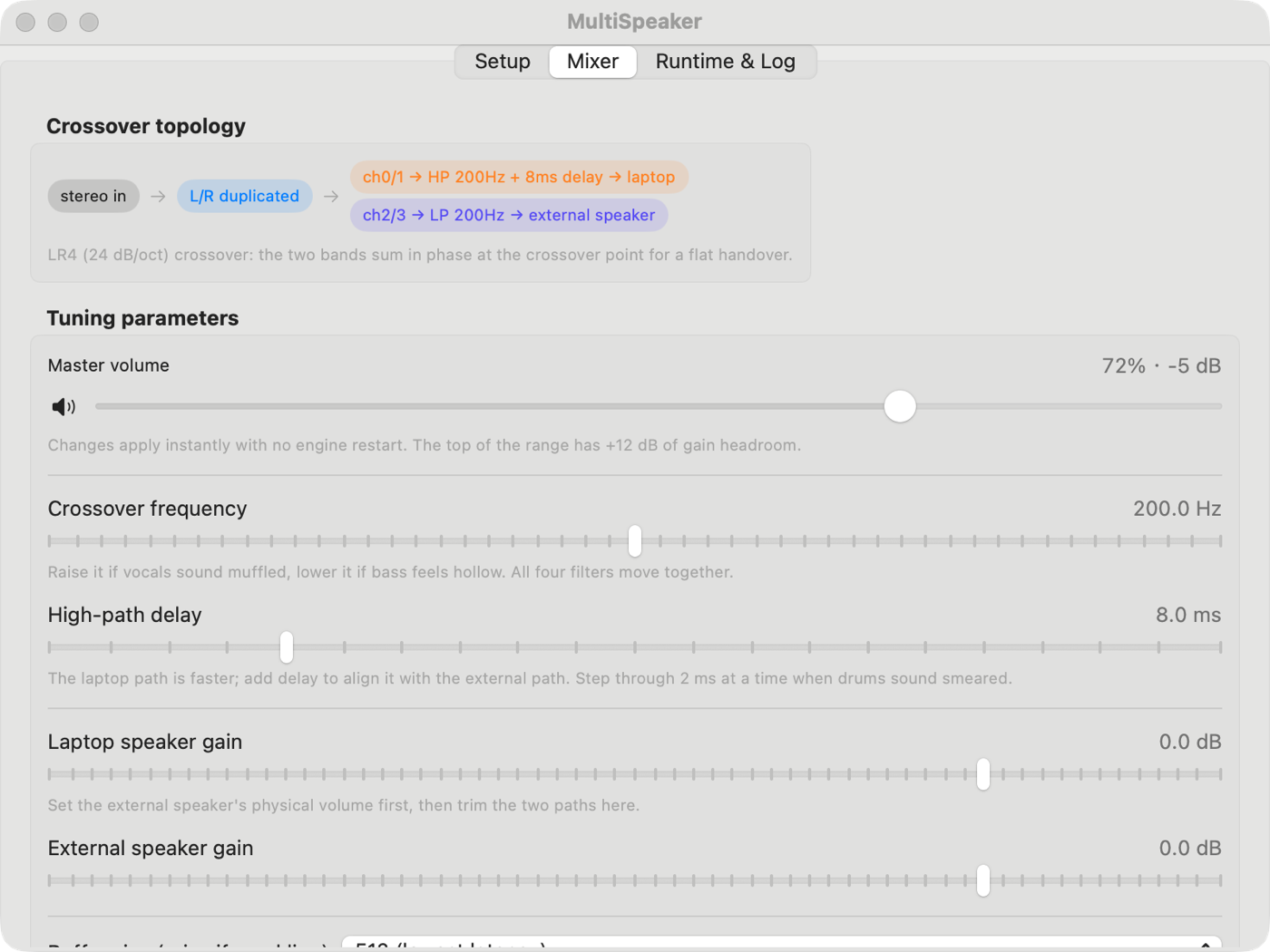
The high-frequency pair feeds the built-in speakers; the low-frequency pair feeds the external output. The documented design uses a fourth-order Linkwitz–Riley crossover, with a 200 Hz starting point and an 8 ms delay on the high-frequency path. Those are starting settings, not measured corrections for your room.
Check the Mac and the extra components
The distributed build requires macOS 14 Sonoma or later and Apple Silicon. An Intel source-build route is mentioned upstream, but the verified ZIP is arm64: this article does not present it as an Intel download.
CamillaDSP 4.1.3 is bundled inside the app. BlackHole 2ch is a separate system audio driver and must be installed first. The setup screen can help install it through its official package route; administrator approval and sometimes a restart are needed. Calling the whole setup dependency-free would be misleading.
Install the official release
Download MultiSpeaker v1.1.0 ZIP and read the release notes. Extract the archive and drag MultiSpeaker.app into Applications. The checked ZIP contains the application and its bundled CamillaDSP executable.
The author says the application is not Apple-notarized. Review the source and release provenance before approving it through macOS’s normal security controls; a checksum confirms file identity, not trustworthiness. You can download and extract the exact release with:
curl -fL 'https://github.com/peterxulove/multispeaker-macos/releases/download/v1.1.0/MultiSpeaker.zip' -o MultiSpeaker.zip
unzip MultiSpeaker.zip
Complete setup and grant the required permission
Select the built-in output as the high-frequency device and the external output as the low-frequency device. The setup workflow creates the aggregate device, switches the default output to BlackHole and starts CamillaDSP. The built-in device is the aggregate clock source; the external device uses drift correction.
Allow microphone access when macOS asks. The project explains that reading BlackHole’s input-capable virtual device requires this permission; refusing it can produce silence even while playback appears active. If previously denied, enable MultiSpeaker in System Settings → Privacy & Security → Microphone and restart the app.
Balance the outputs before increasing volume
Begin at a modest listening level. Set the external speaker’s physical volume, balance the two gain controls, and then adjust crossover and delay. The available crossover range is 80–320 Hz; high-frequency delay is 0–40 ms. A larger buffer can reduce dropouts at the cost of extra latency.
Version 1.1.0 sends volume and mute changes through CamillaDSP’s WebSocket connection without restarting the engine. Crossover, delay and other configuration changes still use a debounced restart. The volume ceiling reaches +12 dB, but digital gain can clip; it does not create additional speaker power or guarantee better sound.
Use the menu bar and read the real interface
Closing the main window can leave MultiSpeaker in the menu bar, where you can adjust volume, mute, start or stop the engine, and reopen the window. Login launch and automatic playback are optional. The app supports Chinese and English, following the system or an in-app choice.
The official mixer screenshot shows the tuning controls; the setup screenshot shows the device workflow. The cover on this article is a concept illustration, not an application screenshot or a measurement of speaker performance.
Troubleshoot silence and interruptions
If music plays silently, check the engine’s running state and log panel, the system’s BlackHole output selection, microphone permission, mute and master volume. If only one output plays, rebuild the aggregate device through the setup screen rather than assuming the audio file is at fault.
For crackles or dropouts, the documentation suggests increasing the buffer from 1024 to 2048. Device changes or driver installation can require a restart. When finished, switch the default output back to the built-in speakers or another physical output; leaving it on BlackHole after stopping processing can leave ordinary playback silent.
Know where the improvement stops
Unlike macOS’s ordinary Multi-Output Device workflow, MultiSpeaker intentionally assigns different frequency bands to its two outputs. It is useful when that division matches your equipment. It is not a tool for making several independent speakers play identical full-range music throughout a house.
It is also not automatic room correction. Placement, speaker response, room acoustics and device latency still determine the result. The project does not establish universal Bluetooth or AirPlay synchronization, and this review did not test those transports. Do not treat the delay slider as a guarantee for every output combination.
Understand the two licensing layers
The application license is MIT: its own code can be inspected, modified and reused under that license’s notice requirements. The same file explicitly identifies the bundled CamillaDSP binary as GPL-3.0.
That distinction matters if you redistribute the ZIP or create a derivative package. MIT does not remove the bundled component’s GPL obligations. BlackHole is not bundled and has its own GPL-3.0 license. This is an open-source application with third-party components, rather than an entirely MIT-licensed software stack.
Is MultiSpeaker a good fit?
Try it if you have a compatible Apple Silicon Mac, an external speaker that can handle the bass role, and an interest in manually balancing a two-output listening setup. Start with the official release and keep the original system output available while experimenting.
Skip it if you want a driver-free player, verified Intel support in this release, automatic acoustic calibration or guaranteed multiroom synchronization. The repository, English usage guide and release notes are the primary references for this review.
Project facts
- License
- MIT (app); GPL-3.0 (CamillaDSP)
- Platform
- macOS 14+; Apple Silicon (arm64)
- Written in
- Swift 6 / SwiftUI
- Version reviewed
- v1.1.0 (2026-10-19)
Install
curl -fL 'https://github.com/peterxulove/multispeaker-macos/releases/download/v1.1.0/MultiSpeaker.zip' -o MultiSpeaker.zip
unzip MultiSpeaker.zip
Demo
License summary
The application source uses MIT. The release includes GPL-3.0 CamillaDSP; redistribution must also meet that component’s license obligations. BlackHole is installed separately.




