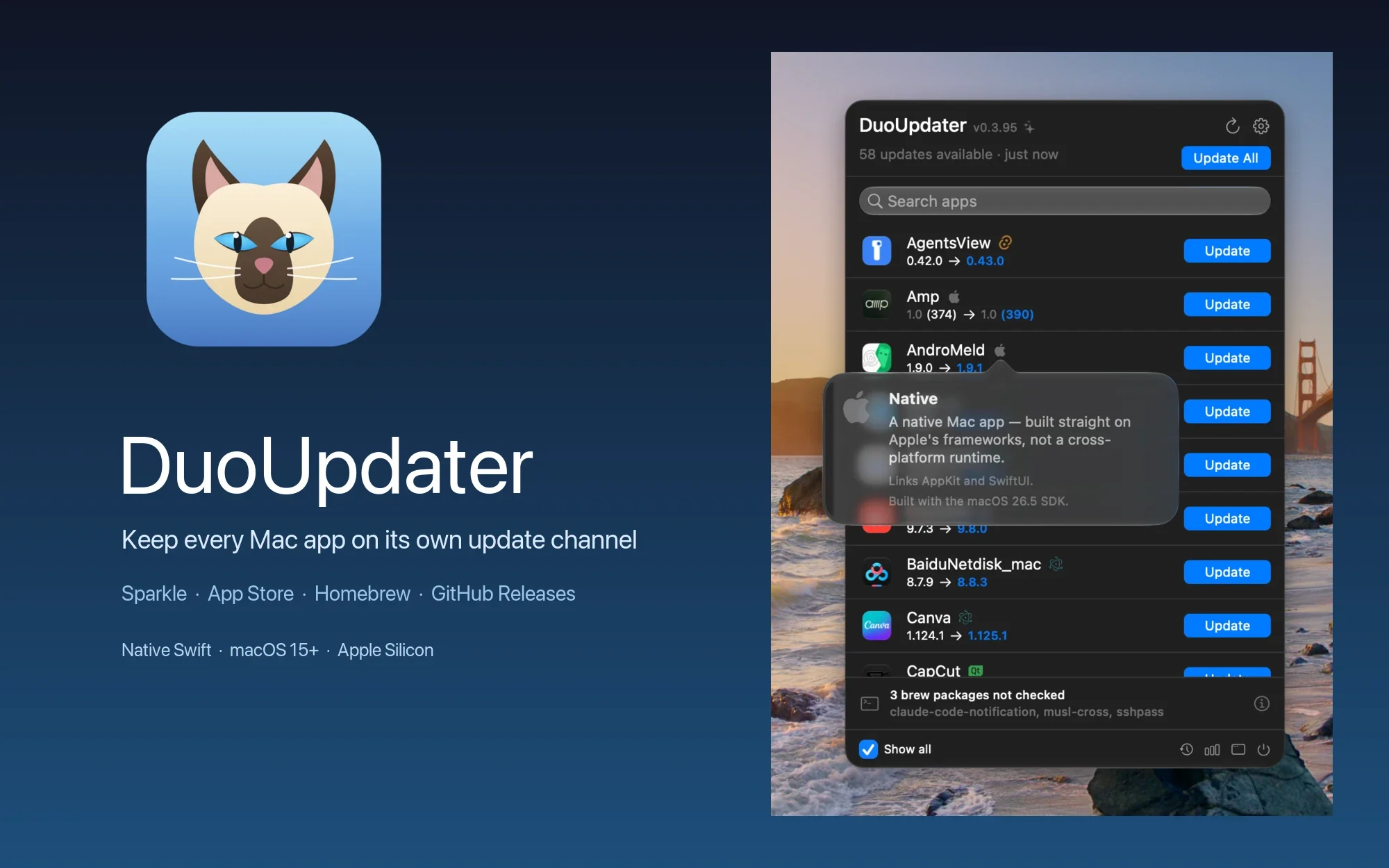
Mac apps do not all need to be updated through the same download path. Sparkle apps have their own appcast, App Store apps are managed by Apple, and Homebrew and GitHub projects each have their own release process; some apps even need to open their own updater. DuoUpdater starts with a simple idea: identify the channel each app actually uses, then update it through the method that channel allows.
The repository is jizhi0v0/duo-updater, written in Swift and released under the MIT License. The latest release checked for this article is DuoUpdater 0.4.1, targeting macOS 15 or later on Apple Silicon Macs.
What problem does it solve?
DuoUpdater is a menu-bar app that scans /Applications, /Applications/Utilities, and ~/Applications and lists the apps already installed on your Mac. Each row shows more than “an update is available”: it shows the current version, target version, update channel, and the action the button will actually perform. If the bundle on disk is already updated but the running copy has not relaunched, the button becomes Relaunch instead of downloading the same version again.
It also lists non-.app items installed by Homebrew, including command-line formulae, fonts, and drivers. A cask that installs an app bundle is still handled as a normal app, so it is not counted twice in the menu. That detail makes “what I have installed” mean more than the .app files visible in Finder.
App details also include release notes. Sparkle appcasts and GitHub Releases can usually provide the version, date, and individual changes directly; other sources use a per-app recipe maintained by the project. When a vendor page is not suitable for parsing, DuoUpdater falls back to a non-persistent WKWebView instead of pretending it understood the release notes.
Update through each app's own channel
The order in the README is intentionally fixed: Mac App Store, Xcode Releases, Sparkle, Homebrew Cask, GitHub Releases, Alcove, and only then selected vendor endpoints. The first source that can identify the app owns the answer; the next source is tried only when the result is “not applicable.” Apps managed by JetBrains Toolbox and TestFlight builds are handled separately outside this chain.
“Respecting the channel” means DuoUpdater does not download every app as a ZIP and force-replace it. Sparkle uses its native installer and EdDSA when the app provides a public key; self-updating apps are opened and handed back to their own updater; Homebrew apps use their cask; App Store updates go through mas and a privileged helper; and GitHub or vendor downloads run only when explicit rules validate an installable asset.
Safety checks before an update
For bundles that DuoUpdater installs itself, the project checks the code signature, Team ID, bundle ID, and runnable architecture in addition to validating the source. A native Apple Silicon app cannot be replaced with an Intel-only build. Before installation it re-reads the bundle on disk and queries the source again, so a stale list cannot trigger a duplicate install.
An update can save a rollback backup first, and Settings can choose whether to relaunch the app automatically. DuoUpdater never force-quits a running app: it calls ordinary terminate(), allowing the app to show a save prompt and refuse to quit. If it refuses, the updated file can still be on disk, but the interface keeps a Restart action so an update does not cost you unsaved work.
Major-version upgrades show a warning first because commercial apps may require a new license. Another boundary is .pkg/.mpkg: once the system installer takes over, DuoUpdater can check the package signature, Team ID, destination, and OS version, but it does not inspect the architecture of every Mach-O inside the package and cannot automatically roll back an architecture change after the installer finishes.
App Store, TestFlight, and permissions
An App Store app is not an ordinary download link. DuoUpdater can handle the full download through mas and a background helper; if the helper has not been approved or the app is region-locked, it falls back to a deep link or the App Store updates page and marks the region lock. The background helper must be allowed under macOS Login Items & Extensions.
TestFlight betas have their own switch. When it is off, DuoUpdater does not read TestFlight data; when it is on, a refresh or hourly check may briefly start TestFlight in the background. Full Disk Access is required to read available TestFlight builds and the CotEditor channel, but it is not needed for ordinary app-update checks.
Permissions are split by function: you can see the app list, check versions, and read release notes without granting anything. App Management handles replacing apps in /Applications, Notifications only affects alerts and the Dock badge, and Accessibility is needed only when the graphical App Store route or installer-window closing is enabled. DuoUpdater does not confuse being able to detect an update with being able to install it.
The Release Log is more than an update list
DuoUpdater records every version it sees and gradually builds a software release log. It is deliberately conservative about time precision: it shows an exact time only when Sparkle, GitHub, Alcove, or an electron-builder manifest provides one. Sources that provide only a version get an estimated window between the last observation of the old version and the first observation of the new one, marked with ≈.
This keeps the heatmap from treating guesses as facts. A vendor may have released a new version without telling the client when it was published; DuoUpdater records the evidence that something changed instead of disguising the detection time as the release time. When a selected app provides structured release notes, they appear as native text on the right rather than as a web page embedded in the window.
The v0.4.1 release notes show this ongoing maintenance: Sogou Input Method can now update with one click and back up its dictionary and settings, JetBrains Air uses the build actually supplied by Toolbox, the renamed App Store copy explains which copy performs the update, and Markdown release notes are formatted as a native list.
The same engine is available as duo CLI
The repository is more than a menu-bar UI. The duo CLI links to the real DuoUpdaterCore and uses the same source order, install strategy, ignore rules, and skip rules. If the CLI and GUI make different decisions, that should be treated as a bug rather than two separate product logics. Common commands include duo list, duo check --json, duo install Cursor, duo doctor, and duo backups.
duo list                     # list installed apps without network access
duo check --json             # one JSON object per line
duo install Cursor           # install one update, or use --all
duo doctor                   # check whether this Mac can install
duo backups                  # list or restore rollback points
The CLI also supports --source sparkle,github,…, --include-hidden, duo ignore, and duo skip. It explicitly refuses App Store updates because the command line has no app bundle, privileged helper, or Accessibility route; it also will not seize the menu-bar app's install lock. Refusing a half-supported flow is part of its safety boundary.
Privacy: no first-party telemetry server
The project states that it has no telemetry, analytics SDK, or first-party server. Network requests go directly to the vendor being checked, or to api.github.com and formulae.brew.sh, carrying only the information needed to check versions. That model is easier to explain than uploading every app version to a central cloud database.
But “no telemetry” does not mean “no external data is ever read.” If CleanShot X is installed, DuoUpdater reads its activationKey preference and asks CleanShot's own endpoint for a personalized appcast; it also reads TablePlus's beta switch and channel settings for some apps. A GitHub token may come from an environment variable or gh auth token, but it is sent only to api.github.com and removed from redirects that leave that host.
These reads should be understood in their functional context rather than described as blanket local privacy. Credentials that the user enters, such as a GitHub token or Alcove license, are stored in the login Keychain; vendor release notes use a non-persistent WKWebView and do not retain vendor cookies after a restart. Before first use, check the privacy notes and permission switches for the apps you actually have installed.
How to install
I could not find an App Store page for DuoUpdater itself, so the official installation path is GitHub Releases. The repository says its public builds are notarized; the current DuoUpdater 0.4.1 macOS ZIP is for Apple Silicon and macOS 15 or later.
# Open the latest release page:
open https://github.com/jizhi0v0/duo-updater/releases/latest

# Or download the v0.4.1 Apple Silicon ZIP directly:
open https://github.com/jizhi0v0/duo-updater/releases/download/v0.4.1/DuoUpdater-0.4.1-macos.zip
After downloading the ZIP, extract it and move DuoUpdater.app to /Applications. On first launch, grant App Management, notification, or other functional permissions as needed. It can continue checking apps without those permissions; macOS asks for the relevant permission only when you use that installation route. Apple Silicon is a hard requirement, and Intel Macs are outside the current product scope.
Build from source only when you need to change the code
Most users should prefer the Release ZIP above. If you want to study the update engine or change the menu-bar interface, the repository separates the core, app, and CLI into three parts: DuoUpdaterCore/ is an independently testable Swift Package, App/ is a SwiftUI MenuBarExtra app generated by XcodeGen, and CLI/ contains the duo command.
# Build and test the core package:
cd DuoUpdaterCore
swift build
swift test

# Generate the macOS app project:
cd ../App
xcodegen generate
open DuoUpdater.xcodeproj
The current source build requires Swift 6.4, which means the Xcode 27 toolchain; the deployment target remains macOS 15. To install your own build in /Applications, the repository provides make install, which builds a Release, signs it with a stable Developer ID, and deploys it to the standard location. A fork using your own team can set DUO_TEAM_ID=YOURTEAMID first.
Building from source does not bypass signing. The privileged helper and app derive the Team ID from the actual runtime signature; unsigned or ad-hoc builds refuse to connect, preventing an app with an unfixed identity from communicating with the root helper. A production release also needs Apple notarytool credentials, but ordinary users do not need to configure them.
Where it stops
DuoUpdater is not a universal database that guarantees automatic updates for every piece of Mac software. GitHub Releases, vendor endpoints, and recipes can change with page structure; the project chooses to maintain verified app rules instead of making approximate guesses for every product. When there is no clearly installable asset, it stays at detection or opens the original page rather than picking a random download.
System installers, regional restrictions, the App Store helper, TestFlight data permissions, and an app's own save prompt can also affect the final result. DuoUpdater can bring the workflow into one interface, but it cannot solve a vendor's licensing, network, account, or macOS permission problems.
License
DuoUpdater uses the MIT License. You may inspect, modify, and use the code in commercial projects, but redistribution must retain the copyright and license notice. mas, Sparkle, swift-subprocess, vendor services, and the third-party apps being updated each have their own licenses or terms; the MIT license of the main repository does not make them one combined grant.
Should you install it?
If you use an Apple Silicon Mac, want one place to see app updates, and do not want to force Sparkle, Homebrew, GitHub, and the App Store into one download model, DuoUpdater is worth trying from the v0.4.1 Release. Its value is channel detection, pre-installation re-checks, and a defined rollback boundary; its limits are equally clear: Apple Silicon only, macOS permissions for some installation routes, and vendor-page changes that no recipe can eliminate completely.
Project facts
- License
- MIT
- Platform
- macOS 15+ / Apple Silicon only
- Written in
- Swift 6.4, SwiftUI, AppKit, Swift Package Manager
- Version reviewed
- v0.4.1 (GitHub Release, checked 2026-09-21)
- Repository
- github.com/jizhi0v0/duo-updater
Install
# Open the latest GitHub Release:
open https://github.com/jizhi0v0/duo-updater/releases/latest

# Download the current Apple Silicon macOS ZIP:
open https://github.com/jizhi0v0/duo-updater/releases/download/v0.4.1/DuoUpdater-0.4.1-macos.zip
License summary
The repository is published under the MIT License. Keep the copyright and license notice when redistributing the code. Bundled tools, frameworks, vendor feeds and third-party applications retain their own terms.


