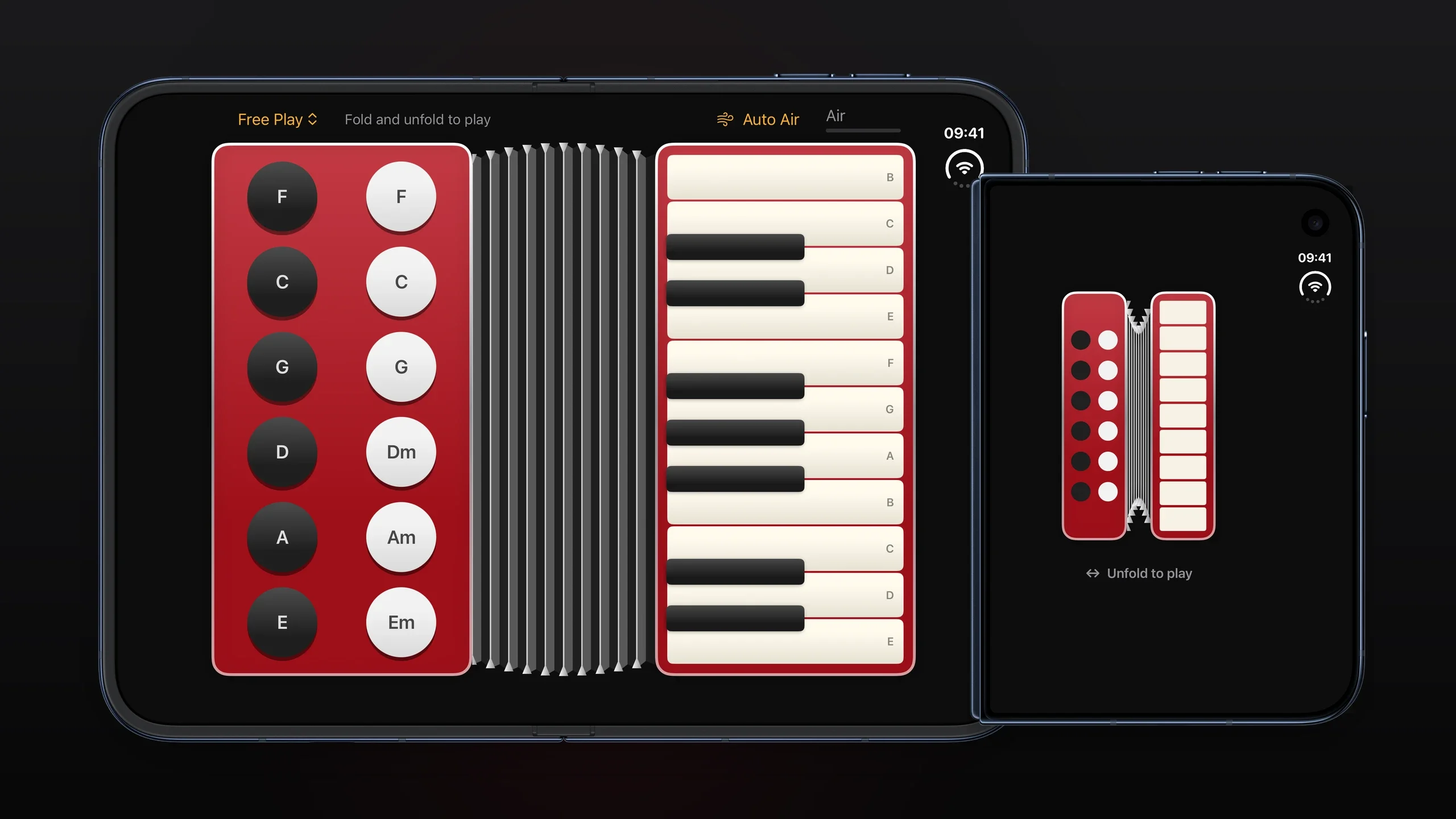
A foldable phone has a hinge, and a hinge is a sensor. Most apps that read it do something predictable with the value — resize a layout, split a list across the two halves, or park a toolbar on one panel. Accorduon reads the same angle and uses it as a musical expression control. The phone is the instrument; folding it is the gesture.
It is a small project, one commit deep, written by Artem Novichkov. What makes it worth writing about is that it is a complete, readable example of three things that are individually fiddly: the iOS 27 hinge API, real-time audio synthesis in Swift, and multi-touch keyboard handling in SwiftUI.
What It Does
Open the app on an iPhone Duo and you get a two-panel accordion. The upper panel carries a treble keyboard — a piano layout you play with the fingers of one hand. The lower panel carries bass chord buttons, the kind an accordion's left hand works: F, C, G, D minor, A minor, E minor.
The hinge angle is the bellows. Open the phone wider and the notes get faster and more open; squeeze it and they close down. Pitch also bends with the fold, and there is a breath-like air hiss on top, because a real accordion is not a clean tone — the reed noise is a large part of why it sounds like an accordion.
Five songs are built in, written out as note data rather than as audio files: Ode to Joy, Twinkle Twinkle Little Star, Jingle Bells, Happy Birthday, and Katyusha. Each is a sequence of bars you can play through on the keyboard.
How to Install It
There is no public App Store listing or downloadable GitHub Release for Accorduon, so building from source is the only installation path. You need Xcode 27.1 or later and the iOS 27.1 SDK, because the hinge API the app depends on does not exist in earlier versions. Swift 6 is required for the concurrency model the audio code uses.
Clone the repository and build the scheme. The simulator destination is the foldable iPhone Duo:
git clone https://github.com/artemnovichkov/Accorduon.git
cd Accorduon

xcodebuild -project Accorduon.xcodeproj -scheme Accorduon \
  -destination 'platform=iOS Simulator,name=iPhone Duo' build
In the simulator you can drive the hinge from the device controls, which is how you get the fold gesture without hardware. On a real device it works by folding the phone.
How to Use It
Play the treble keyboard normally — it is multi-touch, so chords work, and it is built on SpatialEventGesture rather than a grid of tappable views. That matters because a piano roll made of buttons cannot handle a finger sliding across several keys, which is exactly what playing an instrument looks like.
Play the bass buttons with the other hand for chord accompaniment. Then work the hinge. The fold angle feeds the synth continuously; the app watches for changes rather than polling, through the hinge callback:
.onHingeChange { _, newContext in
    guard let degrees = newContext.hinge?.angle.degrees else { return }
    let speed = abs(degrees - last.degrees) / seconds
    audio.synth.pump(speed / 120)
}
Read that closely and the design is visible: the handler computes how fast the angle is changing, normalises it against a reference rate, and pumps that into the synth. So it is not the angle that shapes the sound but the speed of the fold — the bellows are driven by motion, which is how an accordion actually behaves.
The Demo
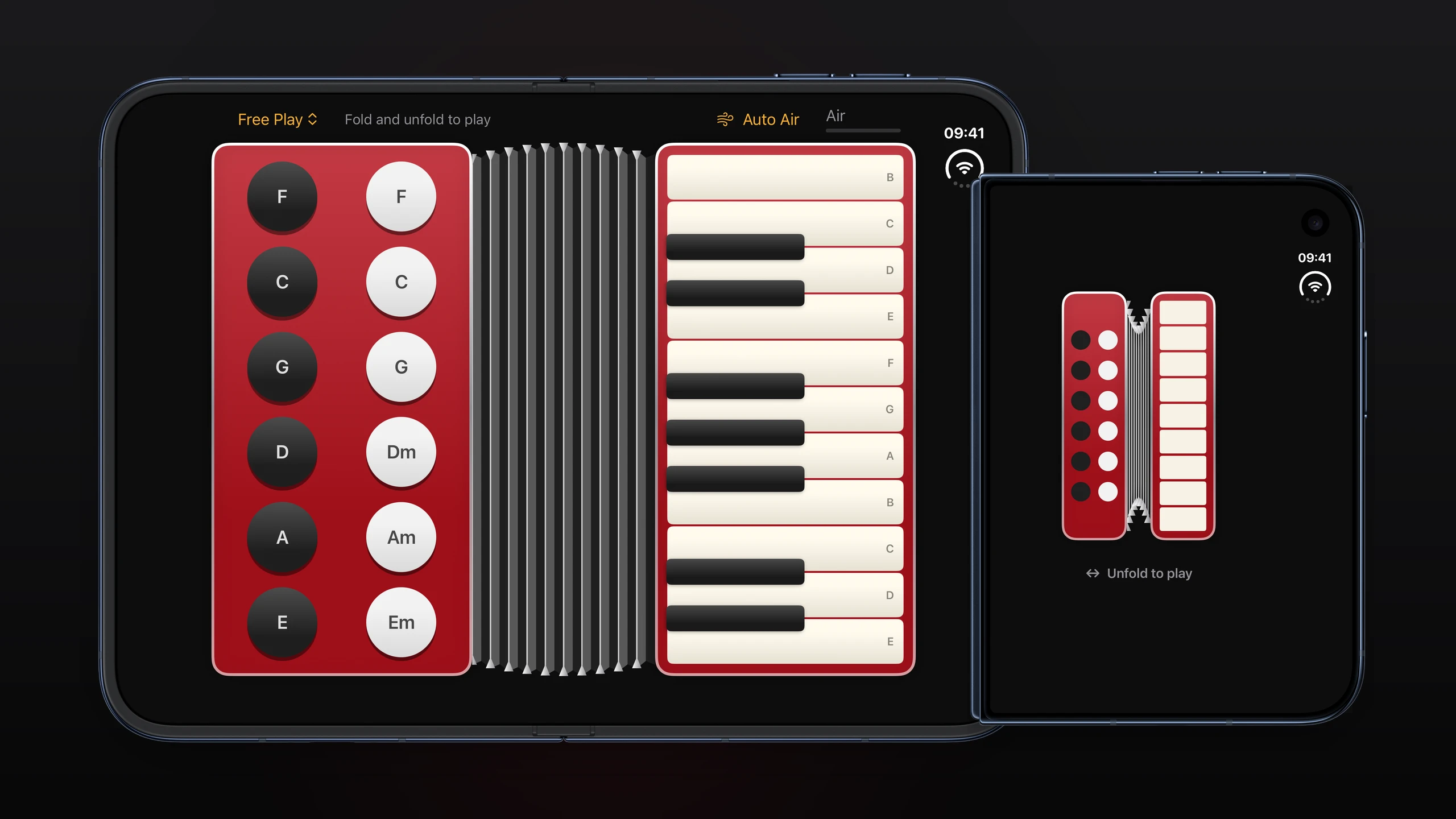
The screenshot above shows the two-panel layout. What a still image cannot convey is the coupling: the keyboard, the bass buttons and the hinge all feed one audio graph, so the instrument responds to all three at once. If you want to hear it before building it, the project README is the place to check for a recording, since the repository ships screenshots only.
The instrument is worth running on hardware rather than the simulator. The hinge gesture is the whole point of the app, and a simulator control that stands in for a fold is a poor substitute for actually folding the phone.
How the Audio Works
This is the part most worth reading if you are here for the code. There are no sample files in the project. The reed sound is generated from scratch, and the approach is a set of deliberate choices that add up to something that sounds like a reed instrument:
Three reeds per note, tuned twelve cents apart — one flat, one at pitch, one sharp. This is the detuned-reed trick that gives an accordion or a harmonica its shimmer, and it is the single change that most separates a synthesised reed from a plain tone.
A fourth reed an octave below for body, so the low end is not thin.
PolyBLEP pulses as the oscillator. A naive square or pulse wave aliases badly at high frequencies; PolyBLEP smooths the discontinuities cheaply, which is what makes it usable for a soft synth in a mobile app.
Two resonances in the filter path, standing in for the body of the instrument.
Pitch bend and an air hiss layer, which together make the sound respond to the fold rather than being static while the bellows move.
It renders through AVAudioSourceNode, the callback-based node where you write samples directly. That means the audio thread is real-time and the state it touches has to be safe, so the shared state sits behind a Mutex. This is the part of the codebase to study if you are building anything that makes sound.
The Licence: What You Can Do
Accorduon is MIT licensed, © 2026 Artem Novichkov. For a project like this the practical reading is simple and permissive:
You can use the code commercially. Build a paid app around the synth, or ship the hinge handling inside a product you sell. MIT does not care that your app is closed source.
You can modify and redistribute it, including as part of a larger work with a different licence.
You must keep the copyright notice and the licence text with any substantial portion you copy. That is the whole obligation — there is no copyleft, no requirement to publish your changes, and no restriction on how you use the result.
There is no warranty. As with any MIT project, the author is not liable if it misbehaves.
In practice: attribute it, and you are free. If you do build something with it, the two most reusable pieces are the PolyBLEP reed synth and the onHingeChange handling, both of which are the kind of code that is more annoying to write from a blank file than it looks.
Should You Build It
If you own a foldable iPhone and play anything, yes — it is a small build and the instrument is genuinely playable. If you are an iOS developer, the value is different and probably larger: it is one of very few open-source examples of the iOS 27 foldable APIs used for something other than layout, and the audio architecture is a clean starting point for any app that needs to make sound in real time. Either way it takes a few minutes to clone and build.
Project facts
- License
- MIT
- Platform
- iOS 27.1+ / Xcode 27.1+
- Written in
- Swift 6, SwiftUI
- Version reviewed
- main @ 2026-09-20
- Repository
- github.com/artemnovichkov/Accorduon
Install
git clone https://github.com/artemnovichkov/Accorduon.git
cd Accorduon

xcodebuild -project Accorduon.xcodeproj -scheme Accorduon \
  -destination 'platform=iOS Simulator,name=iPhone Duo' build
Demo
License summary
MIT is a permissive licence: you can use the code in commercial and closed-source apps, modify it, and redistribute it, as long as you keep the copyright notice and the licence text with any substantial portion you copy. There is no warranty. The only practical obligation is attribution.


